


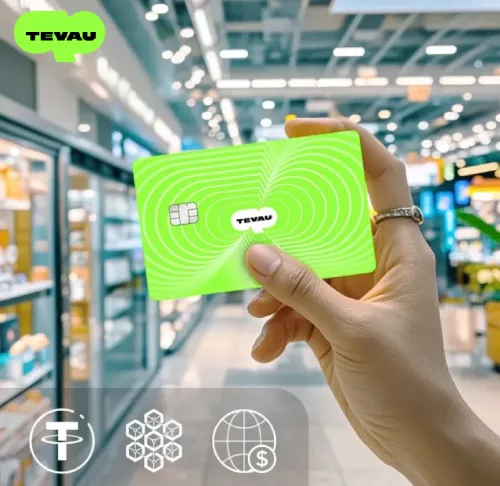


How to Add Your Tevau Card to Apple Pay
How to Add Your Tevau Card to Apple Pay
Apple Pay has become the fastest way to pay in stores, online, and in apps. For Tevau users, adding your card to Apple Wallet turns your crypto payment card into a seamless mobile wallet experience that works exactly like the payment methods iPhone users already rely on every day.
In just a few taps, you can skip the physical card entirely and complete contactless payments with your phone or Apple Watch. Here’s how to set it up and why it matters for daily spending.
Why Apple Pay Matters for Tevau Users
Mobile wallet payments are now standard. People tap their phones at cafes, stores, and transit terminals without thinking twice. For Tevau cardholders, Apple Pay closes the gap between holding crypto value and spending it like normal money.
When your Tevau card is in Apple Wallet, payments become faster and more natural. Instead of fumbling for a physical card or entering payment details, a quick tap handles checkout. That’s especially valuable if you spend Tevau regularly.
Key advantages of using Tevau with Apple Pay include:
- Contactless checkout in seconds
- Payments in apps and on websites without re-entering card details
- Less reliance on your physical card
- Full support for Apple Watch payments
- Seamless integration into your daily payment routine
For many users, Apple Pay transforms Tevau from a separate crypto tool into a card that fits naturally into how they already pay.
Can You Add Tevau to Apple Pay?
Yes. Tevau supports Apple Wallet integration, allowing eligible users to add their card directly through the app. The process is straightforward and takes just a few minutes.
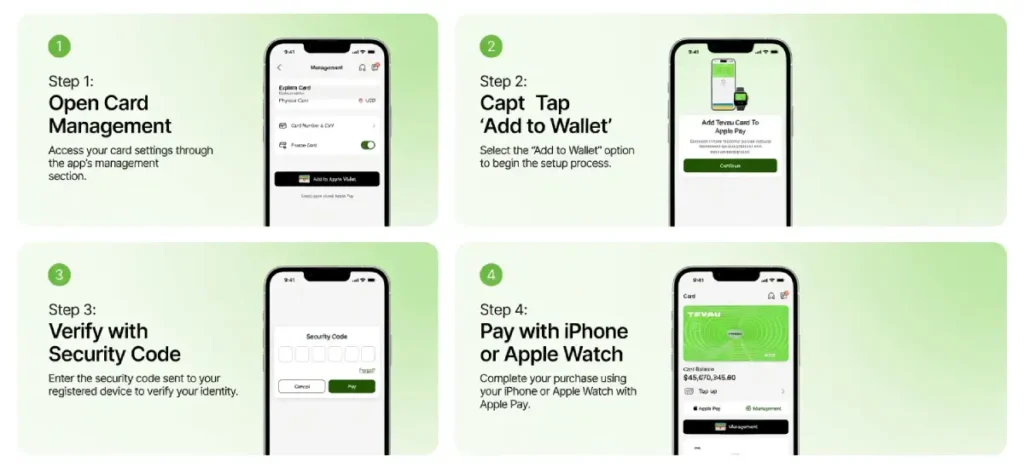
How to Add Your Tevau Card to Apple Pay — 5 Steps
Step 1: Open the Tevau App and Go to Your Card
Launch the Tevau app and navigate to the Kad section. Here you’ll see your active card, current balance, and card management options.
Step 2: Access Card Management
Tap on card management or settings. This area contains all card controls, including the option to add your card to Apple Wallet.
Step 3: Select “Add to Apple Wallet”
Look for the Apple Wallet or Apple Pay option and tap it. This begins the enrollment process to connect your Tevau card to your iPhone.
Step 4: Complete Security Verification
You’ll be asked to verify your identity with a security code. This confirms that you, the cardholder, are requesting the wallet activation. Enter the code sent to your phone or email.
Step 5: Finish Apple Pay Enrollment
Once verified, your Tevau card is added to Apple Wallet. It’s now ready to use for contactless payments on iPhone and Apple Watch.
How to Use Apple Pay With Your Tevau Card
Once your card is added to Apple Wallet, using it for payment is simple.
To pay in person with iPhone:
- Double-click the side button (or home button on older iPhones)
- Authenticate with Face ID, Touch ID, or your passcode
- Hold your phone near a contactless payment terminal
- Wait for the checkmark and confirmation
With Apple Watch:
Double-click the side button on your watch, authenticate, and tap the watch face to the terminal for even faster checkout.
For online and in-app purchases:
Many websites and apps support Apple Pay at checkout. Look for the Apple Pay button and select it instead of entering card details manually.
Common Issues and How to Fix Them
Apple Pay setup doesn’t always work on the first try. Here are the most common reasons and how to resolve them.
Incomplete account or card verification
Make sure your Tevau account is fully verified and your card is active before attempting to add it to Apple Wallet.
Outdated app or iOS version
Update the Tevau app to the latest version and ensure your iPhone is running the current iOS. Compatibility issues often stem from outdated software.
Region or device settings
Apple Pay support varies by country and device. Check that your region supports Apple Wallet and that your iPhone settings allow wallet payments.
Incorrect security verification
Double-check any security codes or verification details. A mismatch will prevent the card from being added.
Temporary service delays
Occasionally, wallet tokenization (the process of encrypting your card for Apple Wallet) experiences brief delays. Wait a few minutes and try again.

Who Benefits Most From Tevau Apple Pay?
iPhone and Apple Watch users: Apple Pay integrates directly with devices you already carry daily.
Frequent in-store shoppers: Contactless payments are faster than any other checkout method.
Travelers: Moving between airports, hotels, and transit systems becomes easier when you can pay with your phone.
Daily Tevau spenders: The more often you use your card, the more you’ll appreciate the convenience of Apple Pay.
Crypto users seeking a normal payment experience: Apple Pay bridges digital assets and mainstream retail spending, making checkout feel familiar and trustworthy.
Why Apple Pay Makes Tevau More Practical
The real value of Apple Pay isn’t just the technology—it’s that it makes paying feel effortless.
For Tevau users, adding Apple Pay means:
- Fewer steps at checkout
- Faster retail and app-based payments
- Easier spending while traveling
- More confidence using your card regularly
- Less friction between holding value and spending it
The easier it is to use Tevau in daily life, the more practical it becomes as a payment solution. Apple Pay removes barriers and integrates seamlessly into existing iPhone habits.
Soalan Lazim
Is Tevau compatible with Apple Pay?
Yes, Tevau provides Apple Wallet integration for eligible users in supported regions. You can add your card directly through the app.
Can I use Tevau with Apple Watch?
Yes, once added to Apple Pay, your Tevau card works on Apple Watch for contactless payments.
Do I need to verify my card before using Apple Pay?
A security verification step is required during setup to confirm you are the cardholder. This protects your account.
What if Apple Pay setup fails?
Ensure your card is active, your Tevau account is fully verified, your app is updated to the latest version, and your iPhone is running current iOS. Then try again.
Can I use Tevau Apple Pay online?
Yes, many websites and apps support Apple Pay at checkout. Look for the Apple Pay button during payment.
How secure is Apple Pay with Tevau?
Apple Pay uses tokenization and encryption to protect your card details. Your actual card number is never shared with merchants. Tevau’s security verification adds an additional layer of protection.
Ready to use your Tevau card with Apple Pay? Download the Tevau app and add your card to Apple Wallet today.
- Muat turun: tevau.co/muat turun
- Community: @tevau_community
- X: @Tevau_co